

If you’ve been trying to understand Power Query and Power BI, you’ve probably searched for “Power Query vs Power BI” at some point. That’s usually where the confusion begins.
Most articles compare them like two separate tools that do similar things. It sounds helpful at first, but it actually leads to a misunderstanding of how they work in real projects. Power Query and Power BI are not alternatives. They are parts of the same process, and once you see how they fit together, things start to make a lot more sense.
The Real Difference
The easiest way to understand this is to look at their roles. Power Query is used to prepare data, while Power BI is used to analyze and present that data.
Power Query is already built inside Power BI, so it’s not something you choose instead of it. A better way to think about it is this: Power Query handles the messy work before analysis, and Power BI handles everything that comes after.
What Power Query Actually Does
In most real-world situations, data is not clean. It comes from different sources, has missing values, duplicates, and inconsistent formats. Before you can analyze anything, that data needs to be fixed.
This is where Power Query comes in. It allows you to connect to different data sources, clean errors, reshape data, and combine multiple tables into one structured dataset. You can remove duplicates, standardize formats, and automate all of these steps so they don’t have to be repeated manually.
All of this happens before the data is loaded into Power BI. Even though Power Query uses a language called M in the background, most users work with it through a simple visual interface.
What Power BI Actually Does
Once your data is clean and ready, Power BI takes over. This is where you start exploring the data and turning it into insights.
Power BI allows you to build relationships between tables, create calculations using DAX, and design dashboards that help people understand what the data is saying. You can create charts, track performance, and share reports with others.
This part is what most people see, but it depends heavily on the work done earlier in Power Query. If the data is not prepared properly, the analysis becomes harder and less reliable.
Dig Deeper: Data Analyst VS Business Analyst
How They Work Together
To really understand the difference, it helps to look at the full workflow instead of the tools in isolation.
In a typical project, you first bring in data from one or more sources. Then you use Power Query to clean and shape that data so it is consistent and usable. Once the data is ready, it is loaded into Power BI, where you build calculations using DAX and create visuals to present findings by yourself or someone who provides Power BI Dashboard Development & Consulting Services.
Each step builds on the previous one. If the data is not cleaned properly at the beginning, every step after that becomes more complicated than it needs to be.
Comparing Them the Right Way
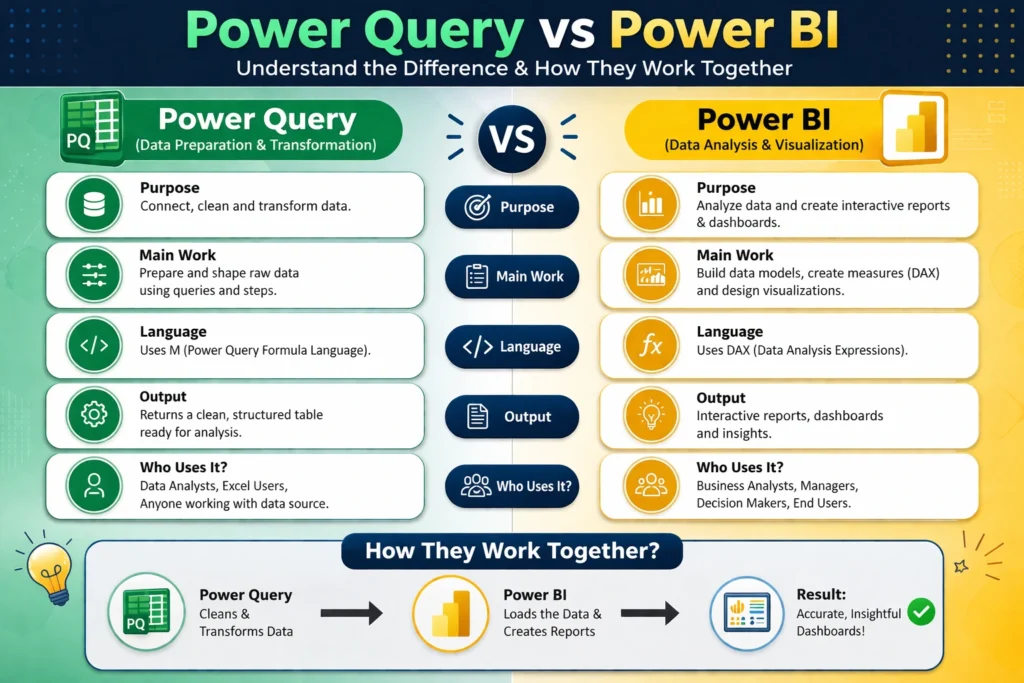
Instead of asking which one is better, it’s more useful to understand what each one is responsible for.
| Aspect | Power Query | Power BI |
| Role | Prepares data | Analyzes and presents data |
| Stage | Before loading data | After loading data |
| Focus | Cleaning and transforming | Insights and visualization |
| Language | M | DAX |
| Output | Clean dataset | Reports and dashboards |
This comparison makes it clear that they are not solving the same problem. They are handling different stages of the same workflow.
M and DAX Explained Simply
Another common source of confusion is the difference between M and DAX. The easiest way to understand this is by looking at when they are used.
M is used in Power Query and works on the data before it is loaded. The changes you make here are applied once and become part of the dataset. DAX is used in Power BI after the data is loaded, and it is designed for calculations that respond to filters and user interaction.
For example, if you need to clean columns, merge tables, or fix formatting, that belongs in Power Query. If you need to calculate totals, averages, or growth rates, that belongs in DAX. Keeping this separation in mind makes your workflow much more efficient.
A Simple Example
Imagine you are working on a sales report with data coming from multiple files. Some rows are duplicated, date formats are inconsistent, and product names are slightly different across sources.
You would start with Power Query to combine all the data into one place, remove duplicates, fix date formats, and standardize product names. Once the data is clean, you move to Power BI to calculate total sales, measure profit margins, and build charts to show trends. If you skip the first step, the second step becomes much harder and less reliable.
Common Mistakes to Avoid
A lot of confusion comes from using these tools in the wrong way. One common mistake is trying to clean data using DAX, even though it is not designed for heavy data preparation. Another is skipping Power Query altogether, which leads to messy data models and poor performance.
Some people also think they need to choose between the two, but in real projects, both are used together. Doing too much work after loading data is another issue. It is always better to clean and structure data early in the process.
When to Use Each
You don’t need to choose between Power Query and Power BI, but it helps to understand where each one fits.
Power Query is used when your data needs cleaning, shaping, or combining. Power BI is used when you want to analyze that data, create reports, and share insights. In most real-world scenarios, both are part of the same workflow.
Final Thoughts
The idea of comparing Power Query and Power BI creates confusion because it frames the problem the wrong way. They are not competing tools, and they are not meant to replace each other.
Power Query prepares the data so it can be trusted, and Power BI turns that data into something useful. When you start using them together instead of comparing them, the entire process becomes clearer and much more effective.
FAQ
1. Is Power Query the same as Power BI?
No, Power Query is not the same as Power BI. Power Query is a data preparation tool used to clean and transform data before analysis. Power BI is a complete data analytics platform that includes Power Query, along with data modeling, visualization, and reporting features. Power Query is one part of the Power BI ecosystem.
2. When should I use Power Query instead of DAX?
You should use Power Query when you need to clean, reshape, or combine data before loading it into your model. DAX should be used after the data is loaded, mainly for calculations like totals, averages, and performance metrics. A good rule is to handle data preparation in Power Query and calculations in DAX.
3. Do I need Power Query if I am using Power BI?
Yes, in most cases you will use Power Query when working with Power BI. Since real-world data is often messy, Power Query helps you prepare and structure it before analysis. Skipping this step can lead to inaccurate results and inefficient data models.
4. Can Power BI work without Power Query?
Technically, yes, you can load already clean data directly into Power BI without using Power Query. However, in practical scenarios, data usually needs some level of cleaning or transformation. That is why Power Query is commonly used in almost every Power BI project.
Check out our other blogs also check out our services where we can help to make your business decisions & generate the revenue stream 5x times faster.